Arcade Doom Machine
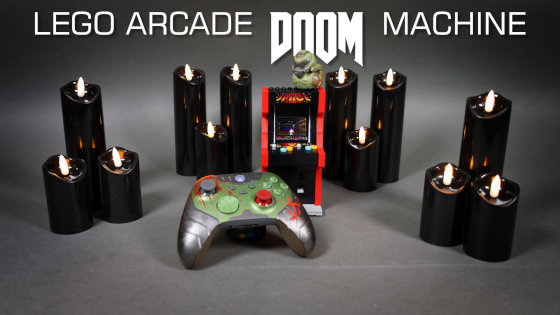
Modification of the LEGO 40805 Arcade Machine set allowing the original Doom to be played inside it.
Datasheet:
Completion date: 01/09/2025
Power: Raspberry Pi Zero 2W
I’m a huge fan of the LEGO 40805 Arcade Machine set, because arcade machines were my introduction to video games back when I was a kid. I’m also old enough to count the original Doom game among the very first PC games I’ve every played. Plus, it’s a well-known internet tradition to run Doom on the most ridiculous setup possible. So far, it has been run on a pregnancy test, smartwatches, fridges, ticket machines, on a Thermomix, Kindle e-readers, as well as inside a PDF file, using bacteria and even inside the Doom itself. So when the 40805 set came out, I though it was only a matter of time before someone runs Doom on it. But as weeks went by and nothing happened, I’ve eventually decided to give it a try myself.
My goal was to make the original Doom game playable inside the 40805 set with nothing coming out of it, ideally using a gaming pad, and only using off-the-shelf components because I hate soldering. Given the very limited room inside the set, I went with Raspberry Pi Zero 2W because it’s tiny, powerful enough to run Doom with ease, but not so powerful as to make cooling an issue. I have initially tried to use a tiny 320 x 240 Waveshare 2-inch SPI display, but I was unable to get Doom to render on it properly. So I switched to a 800 x 480 3.2-inch HDMI display, which Doom worked flawlessly on, except that because of the increased size I had to put that screen inside the set in a portrait orientation, and to flip Doom’s image output 90 degrees to keep it horizontal. As it happened, the display was exactly 6 studs tall, which made it 6 studs wide after rotating, and it fit inside the set perfectly because the original LEGO “display” was 6 studs wide, too.
In order to keep the arcade machine self-contained, I went with Hama Pocket 5 power bank, which was exactly 8 studs wide, reasonably flat, and sported two outputs, as a power supply for the Pi Zero and the display. I have then tested a whole array of cables and cable adapters to find a combination that would fit inside the set with everything connected.
In the end the setup looked as follows:
- the Pi was powered from the power bank using a short USB/microUSB cable and running full Pi OS
- to have a keyboard and a mouse available for configuring stuff, I put a microUSB/USB adapter into the Pi’s other microUSB port, and then I plugged a Logitech BT receiver into it, which has been already paired to a keyboard and a mouse. This made it work as a plug-and-play feature, without having to configure input devices under Pi OS
- the display was powered from the power bank’s other port using a USC/USB-C cable with an angled plug
- to connect the Pi to the display while fitting inside the set, I have used a Waveshare adapter board with two parallel HDMI plugs, which allowed me to “rotate” the display’s HDMI port inwards. I have then used a female-to-female HDMI adapter and then connected a short thin HDMI/miniHDMI cable with angled plugs to it
The original 40805 set has been completely stripped inside, and I had to rebuild the display area to make the display fit. Unfortunately, I was unable to make the set close completely shit because the plugs coming out of the display were about 1-2 mm too thick. In addition, I left an opening on top of the arcade machine to make the powerbank fit in and to allow the heat to escape, because when I tested the setup without any opening, the Pi would overheat and start throttling its CPU.
As for the Doom game itself, it worked perfectly well and was 100% playable. I have acquired a Doom: Dark Ages Xbox controller, which I have connected to the Pi via Bluetooth, and it was correctly recognized by the game (which, technically, was the Chocolate Doom – a Linux port of the original game). The only thing that wasn’t recognized were the controller’s triggers, and I was determined to use them, so I remapped the right trigger to a space key using the AntiMicroX software. Finally, I have paired a Bluetooth speaker with the Pi and tried to use it while playing, but that proved a little too much to handle – the audio was lagging and breaking up.
The whole project was probably not to LEGO purists’ taste, but it was quite a lot of fun. And I got to play the original Doom once more!